Free Download

Beat Plan Template

A ready-to-use Google Sheet template for FMCG beat plans — plan daily routes, assign outlets by day, and track visit status.

Opens in Google Sheets · Works on desktop and mobile

Everything you need in a beat plan

10 ready-to-use columns, sample data, dropdown lists, and instructions — no formatting required.
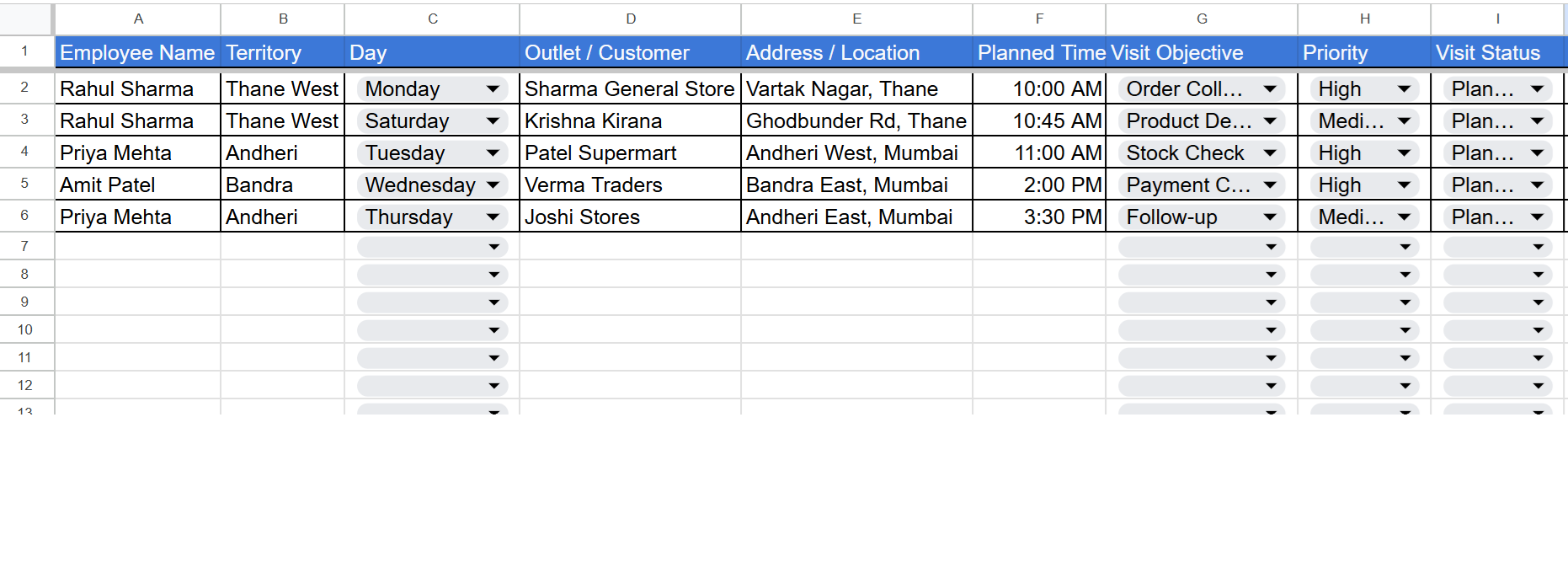
Beat Plan Template — Google Sheet Preview

What's included

  • Employee name & territory
  • Day of the week
  • Outlet / customer name
  • Address & location
  • Planned visit time
  • Visit objective (8 dropdown options)
  • Priority (High / Medium / Low)
  • Visit status (5 dropdown options)
  • Manager remarks column
  • 5 sample rows with real FMCG scenarios
  • Instruction header for team onboarding

Built for field teams

If your team works outside the office, this template is for you.

FMCG Sales

Plan daily beat routes and outlet coverage for distributors.

Pharma MR

Schedule chemist and doctor visits with clear priorities.

Service Engineers

Plan installation and repair visits with clear visit objectives.

Distribution

Assign beats to reps with clear day-wise schedules.

How to use the template

Three simple steps to get started.

1

Click "Download Free Template"

Sign in with your Google account. Google will prompt you to make a copy of the template to your own Drive.

2

Rename and customize

The copy is now yours to edit. Add your team, list your outlets, and set the day-wise schedule for each beat.

3

Share with your team

Share the Google Sheet with your field reps. Or upgrade to an app-based system for automatic GPS verification.

Automate this beat plan with MoveMentrix

Our free template gives you a great starting point. TeamTrail takes it further — automatic GPS check-ins, real-time adherence, and beat plan coverage reports.

Download Free Template Book a Free Demo